Ask About
Ask About
Contextual ways to follow-up on content within an AI Mode response.
3 months
April 2025
Role: UX Lead
PROBLEM
PROBLEM
TL;DR
TL;DR
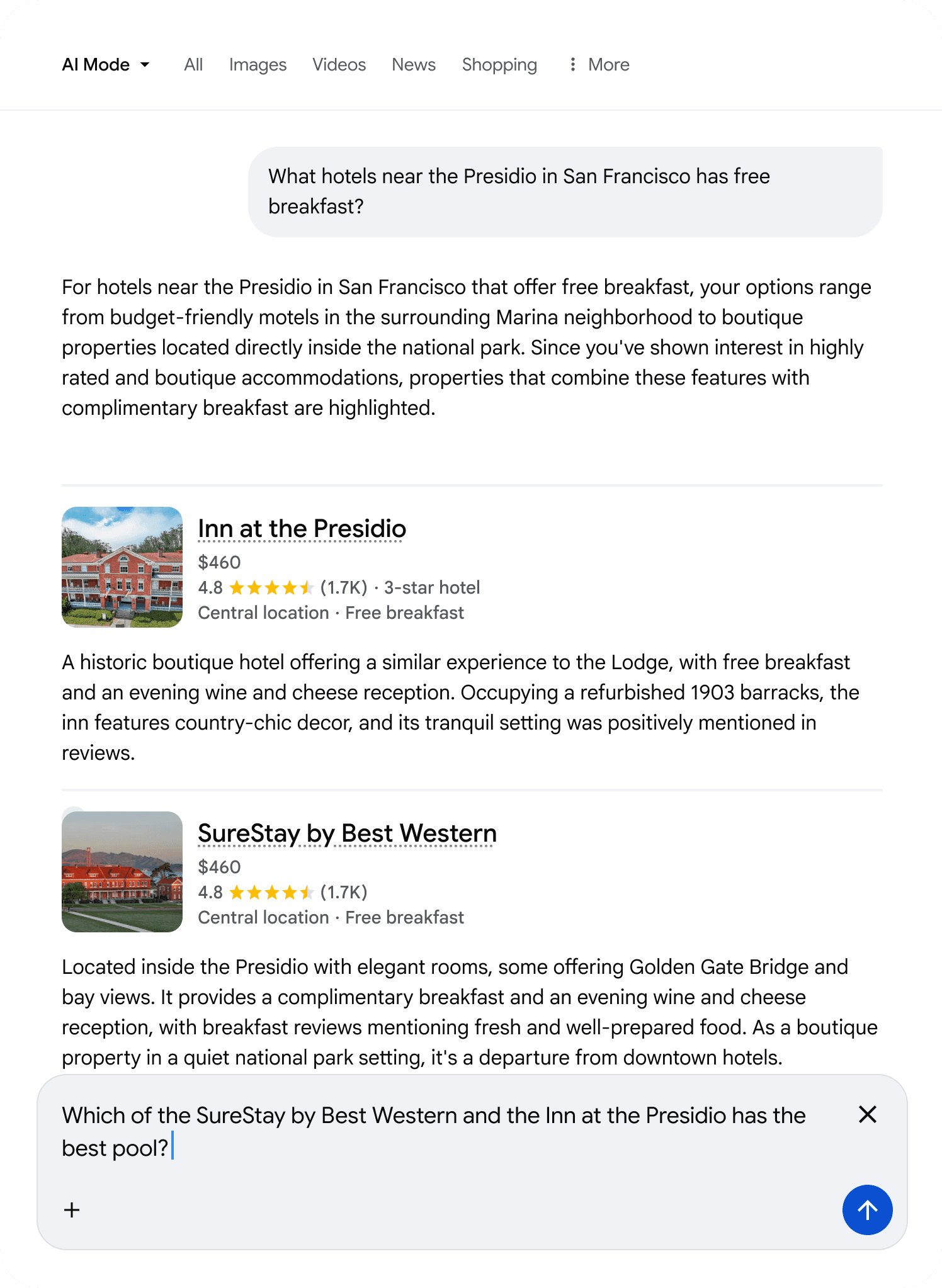
In early user observation of AIM, we noticed a pattern of frustration. AI Mode would provide a great response listing different entities for a search like "What hotels near the Presidio in SF has free breakfast? The user would read it, nod, and then… stop.
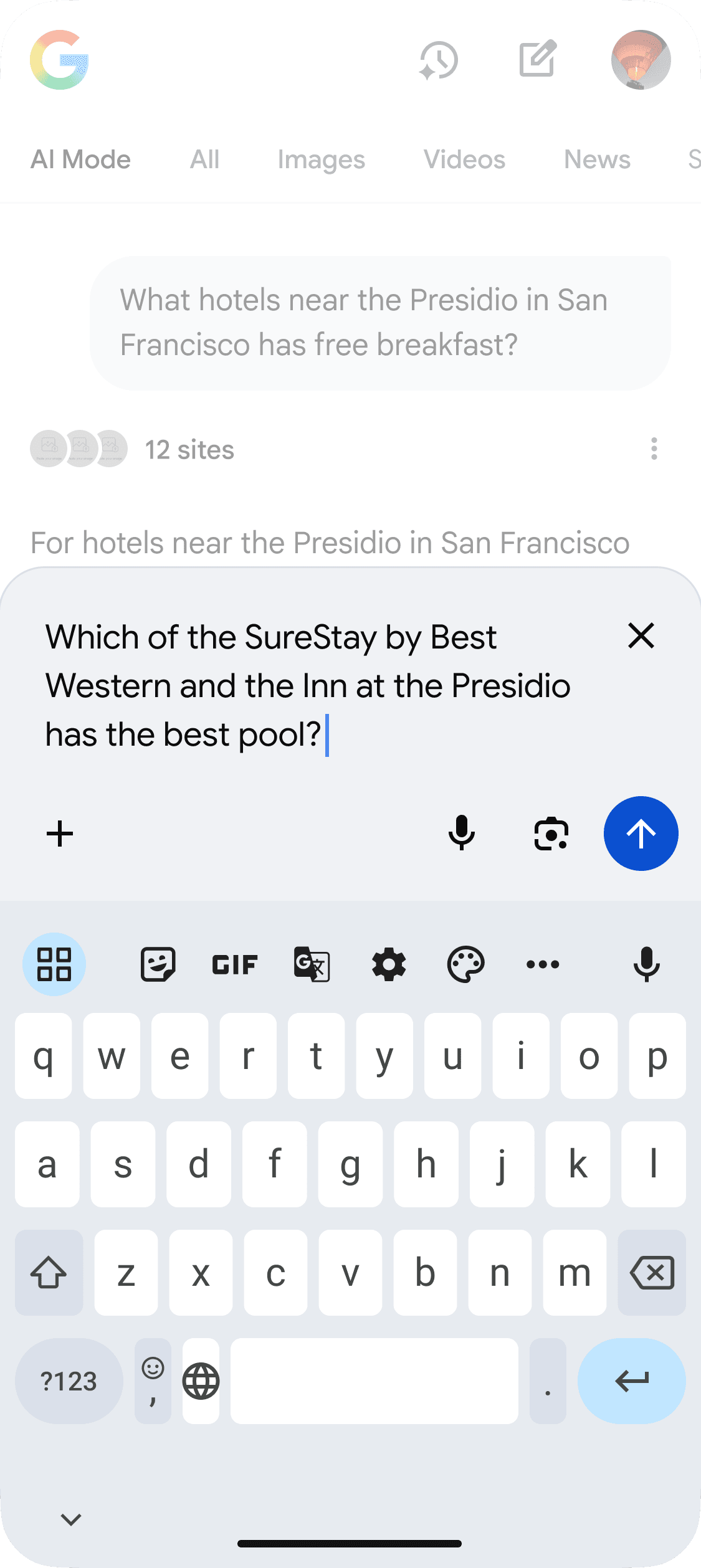
If they wanted to know "Which of these two has the best pool?", they had to mentally switch gears, navigate to the input field, and manually type out the names of the hotels they just read to provide context to the AI.
In early user observation of AIM, we noticed a pattern of frustration. AI Mode would provide a great response listing different entities for a search like "What hotels near the Presidio in SF has free breakfast? The user would read it, nod, and then… stop.
If they wanted to know "Which of these two has the best pool?", they had to mentally switch gears, navigate to the input field, and manually type out the names of the hotels they just read to provide context to the AI.
INSIGHT
INSIGHT
Recognized behaviors
Recognized behaviors
We realized we weren't just solving an efficiency problem; we were solving an engagement problem.
Users viewed the AIM responses as a two dimensional, only being able to interact via input plate. Our hypothesis was that if we lowered the interaction cost to near-zero, we could unlock a new mode of behavior: conversational exploration. We needed to lean on entities within the response to help prompt the user to dive deeper.
We realized we weren't just solving an efficiency problem; we were solving an engagement problem.
Users viewed the AIM responses as a two dimensional, only being able to interact via input plate. Our hypothesis was that if we lowered the interaction cost to near-zero, we could unlock a new mode of behavior: conversational exploration. We needed to lean on entities within the response to help prompt the user to dive deeper.
THE PROCESS
THE PROCESS
Failed attempts & trade-offs
Failed attempts & trade-offs
Designing an affordance that scaled across every search vertical (from travel to complex B2B product comparisons) without cluttering the UI was our biggest challenge. We "failed fast" through several concepts.
Designing an affordance that scaled across every search vertical (from travel to complex B2B product comparisons) without cluttering the UI was our biggest challenge. We "failed fast" through several concepts.
CONCEPT A: DRAG & DROP
Why it failed: Poor discoverability. Users don't always lean on gestures in a chat interface. It felt gimmicky rather than utilitarian.
Why it failed: Poor discoverability. Users don't always lean on gestures in a chat interface. It felt gimmicky rather than utilitarian.
CONCEPT B: VIEWPORT BUTTON
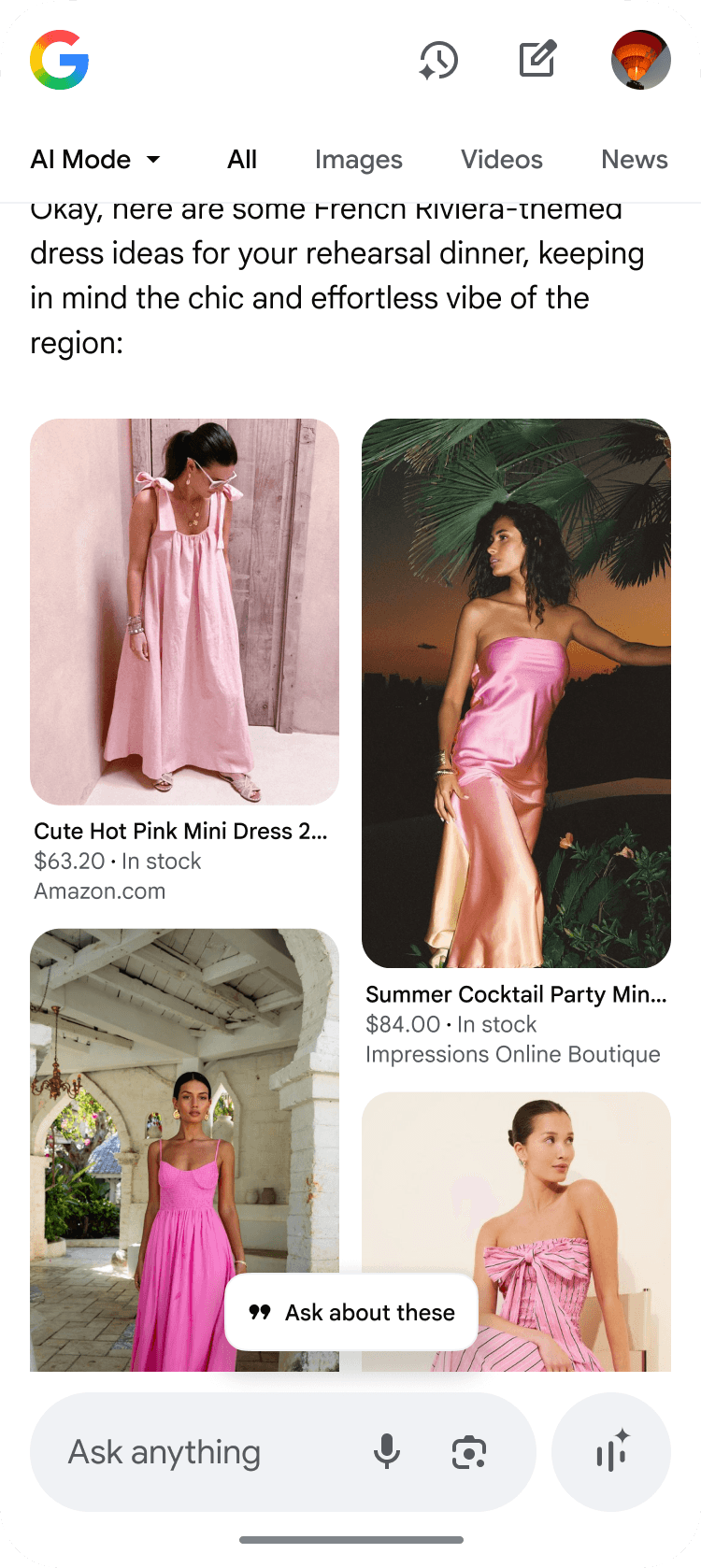
Why it failed: Disconnected context. If a user was looking at "Entity A," but the button appeared near "Entity B," the connection was unclear. The action needed to live within the content it affected.
Why it failed: Disconnected context. If a user was looking at "Entity A," but the button appeared near "Entity B," the connection was unclear. The action needed to live within the content it affected.
THE SOLUTION
THE SOLUTION
Entity Button
Entity Button
We landed on a subtle, intentional interaction model that only revealed itself when the user showed interest. For mobile, we defaulted to showing the checkbox.
We landed on a subtle, intentional interaction model that only revealed itself when the user showed interest. For mobile, we defaulted to showing the checkbox.
1
Hover for Intent
When a user hovers over a structured entity (like a product name), a subtle floating action button appears.
2
Click to select
Clicking transforms the button into a checkbox state, allowing for multi-selection (e.g., selecting three different cameras).
3
The Bridge to Input
Upon selection, the entity is immediately converted into an interactive "chip" inside the main input plate.
Compare something like coffee shops easily, even ask it certain questions:
Compare something like coffee shops easily, even ask it certain questions:
GRIDS, TABLES, & TEXT
GRIDS, TABLES, & TEXT
How it scales
How it scales
The affordance we designed scales perfectly to work with things like grids, tables, and text.
The affordance we designed scales perfectly to work with things like grids, tables, and text.
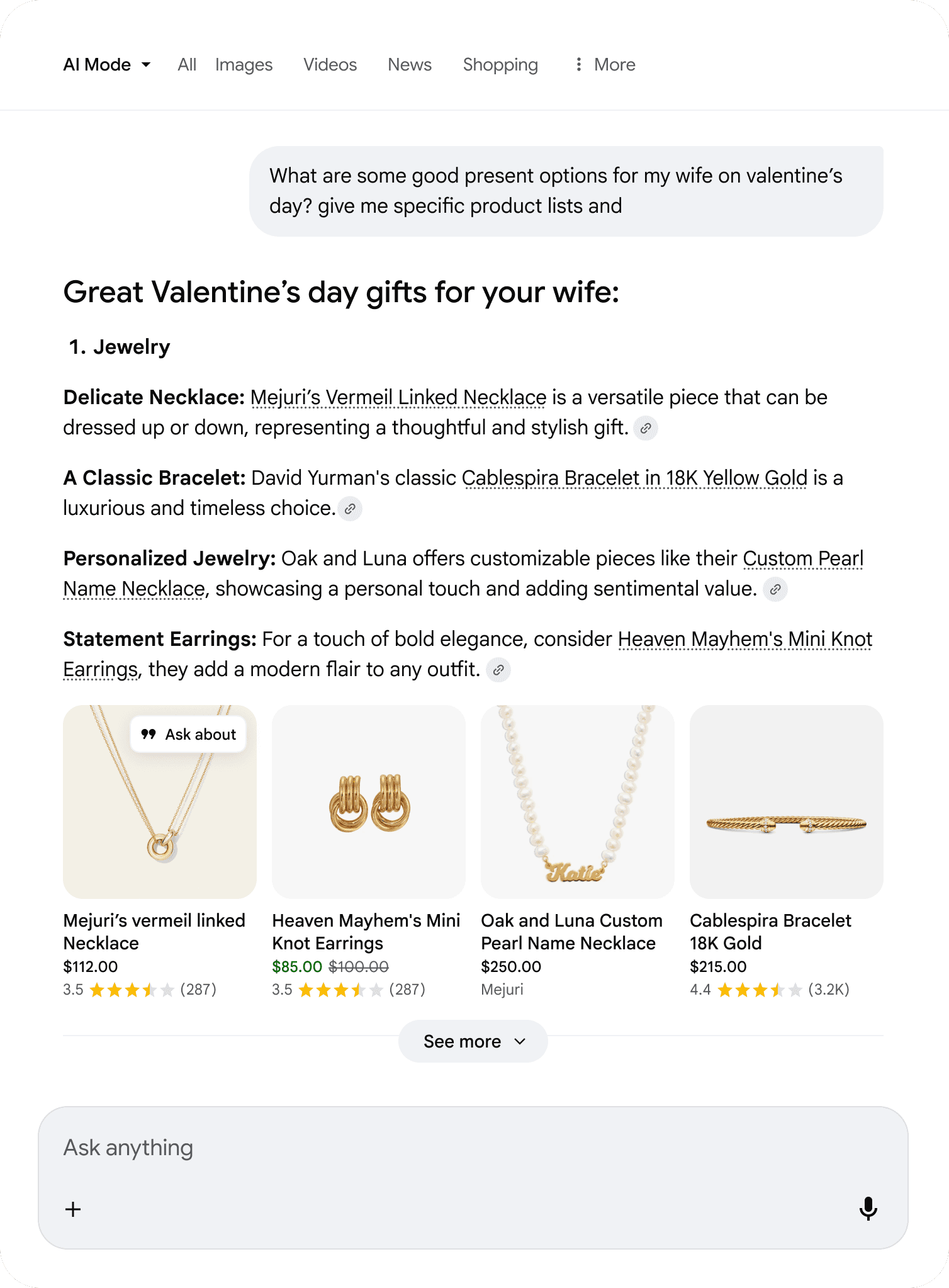
RICH GRIDS
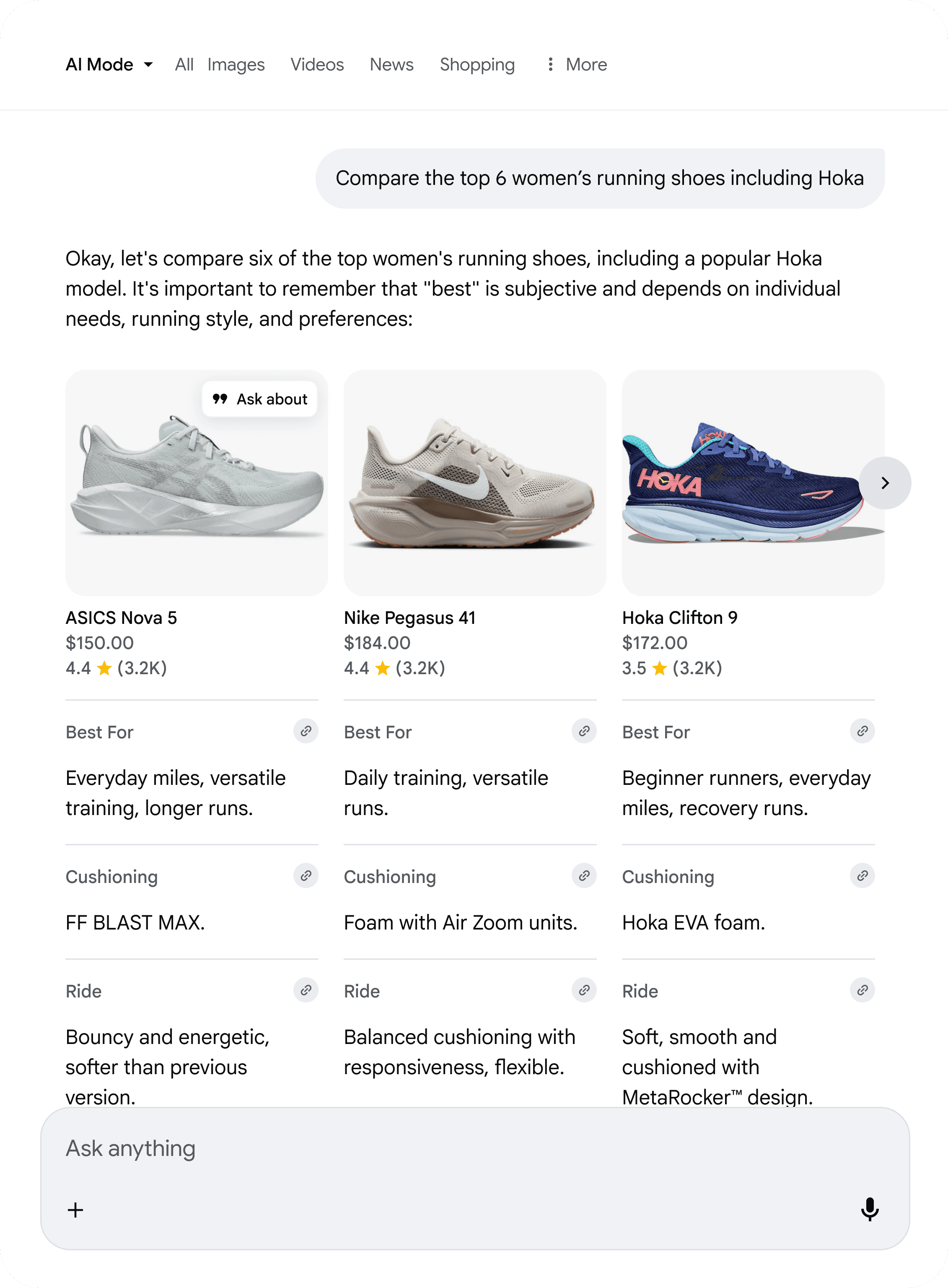
RICH TABLES
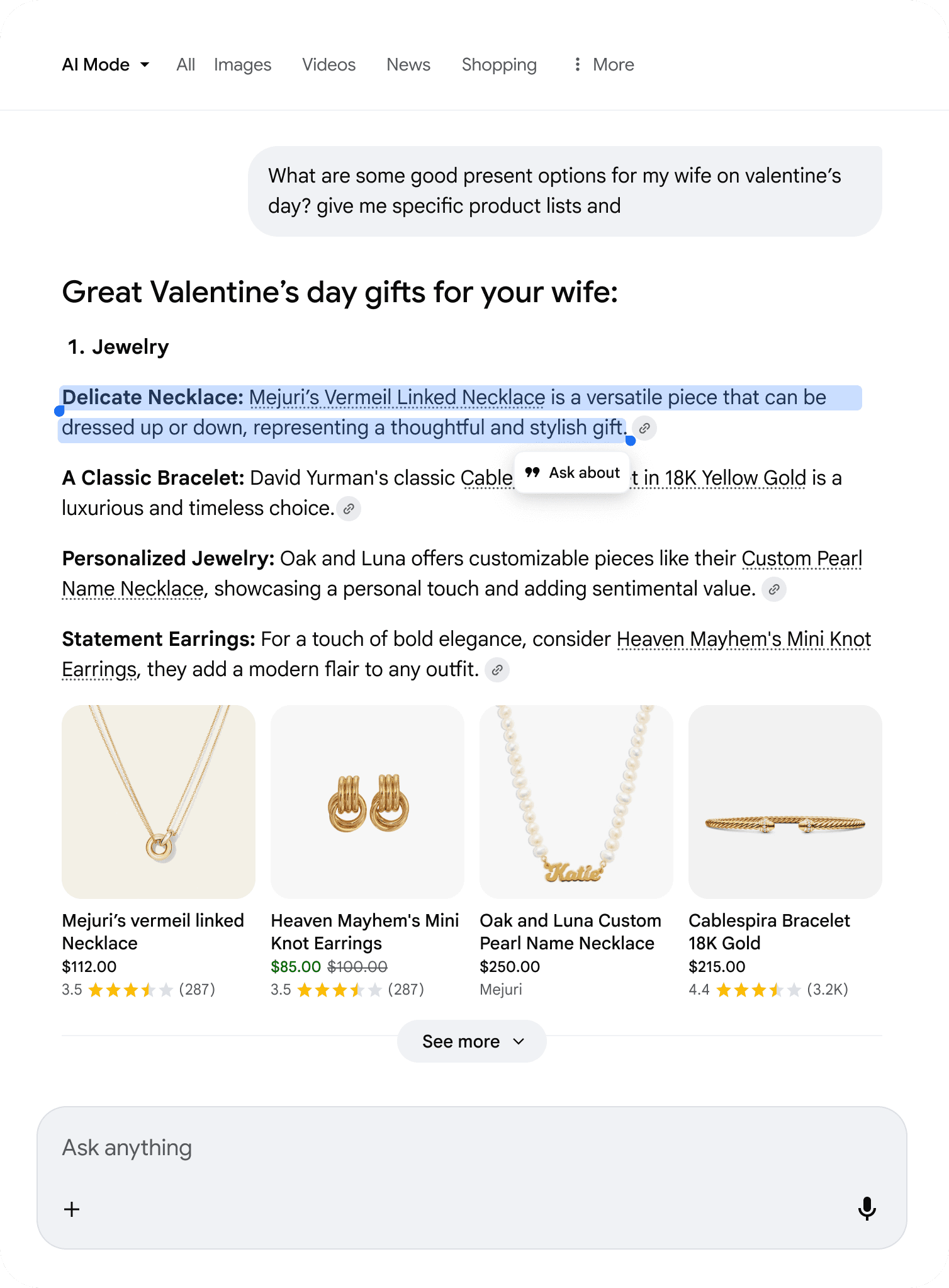
TEXT SELECTION
LOOKING AHEAD
LOOKING AHEAD
Impact & conclusion
Impact & conclusion
USER SATISFACTION
"It feels like I have more control now. I'm not just reading an answer; I'm working with it." - UXR Participant
"It feels like I have more control now. I'm not just reading an answer; I'm working with it." - UXR Participant
MEASURING SUCCESS
Ask About has contributed to an increase of 7% in follow-ups across AIM (millions of users), and is seeing continued adoption across most Search verticals in AIM.
Ask About has contributed to an increase of 7% in follow-ups across AIM (millions of users), and is seeing continued adoption across most Search verticals in AIM.
Ask About
Contextual ways to follow-up on content within an AI Mode response.
3 months
April 2025
Role: UX Lead
PROBLEM
TL;DR
In early user observation of AIM, we noticed a pattern of frustration. AI Mode would provide a great response listing different entities for a search like "What hotels near the Presidio in SF has free breakfast? The user would read it, nod, and then… stop.
If they wanted to know "Which of these two has the best pool?", they had to mentally switch gears, navigate to the input field, and manually type out the names of the hotels they just read to provide context to the AI.
INSIGHT
Recognized behaviors
We realized we weren't just solving an efficiency problem; we were solving an engagement problem.
Users viewed the AIM responses as a two dimensional, only being able to interact via input plate. Our hypothesis was that if we lowered the interaction cost to near-zero, we could unlock a new mode of behavior: conversational exploration. We needed to lean on entities within the response to help prompt the user to dive deeper.
THE PROCESS
Failed attempts & trade-offs
Designing an affordance that scaled across every search vertical (from travel to complex B2B product comparisons) without cluttering the UI was our biggest challenge. We "failed fast" through several concepts.
CONCEPT A: DRAG & DROP
Why it failed: Poor discoverability. Users don't always lean on gestures in a chat interface. It felt gimmicky rather than utilitarian.
CONCEPT B: VIEWPORT BUTTON
Why it failed: Disconnected context. If a user was looking at "Entity A," but the button appeared near "Entity B," the connection was unclear. The action needed to live within the content it affected.
THE SOLUTION
Entity Button
We landed on a subtle, intentional interaction model that only revealed itself when the user showed interest. For mobile, we defaulted to showing the checkbox.
1
Hover for Intent
When a user hovers over a structured entity (like a product name), a subtle floating action button appears.
2
Click to select
Clicking transforms the button into a checkbox state, allowing for multi-selection (e.g., selecting three different cameras).
3
The Bridge to Input
Upon selection, the entity is immediately converted into an interactive "chip" inside the main input plate.
Compare something like coffee shops easily, even ask it certain questions:
GRIDS, TABLES, & TEXT
How it scales
The affordance we designed scales perfectly to work with things like grids, tables, and text.
RICH GRIDS
RICH TABLES
TEXT SELECTION
LOOKING AHEAD
Impact & conclusion
USER SATISFACTION
"It feels like I have more control now. I'm not just reading an answer; I'm working with it." - UXR Participant
MEASURING SUCCESS
Ask About has contributed to an increase of 7% in follow-ups across AIM (millions of users), and is seeing continued adoption across most Search verticals in AIM.
Ask About
Contextual ways to follow-up on content within an AI Mode response.
3 months
April 2025
Role: UX Lead
PROBLEM
TL;DR
In early user observation of AIM, we noticed a pattern of frustration. AI Mode would provide a great response listing different entities for a search like "What hotels near the Presidio in SF has free breakfast? The user would read it, nod, and then… stop.
If they wanted to know "Which of these two has the best pool?", they had to mentally switch gears, navigate to the input field, and manually type out the names of the hotels they just read to provide context to the AI.
INSIGHT
Recognized behaviors
We realized we weren't just solving an efficiency problem; we were solving an engagement problem.
Users viewed the AIM responses as a two dimensional, only being able to interact via input plate. Our hypothesis was that if we lowered the interaction cost to near-zero, we could unlock a new mode of behavior: conversational exploration. We needed to lean on entities within the response to help prompt the user to dive deeper.
THE PROCESS
Failed attempts & trade-offs
Designing an affordance that scaled across every search vertical (from travel to complex B2B product comparisons) without cluttering the UI was our biggest challenge. We "failed fast" through several concepts.
CONCEPT A: DRAG & DROP
Why it failed: Poor discoverability. Users don't always lean on gestures in a chat interface. It felt gimmicky rather than utilitarian.
CONCEPT B: VIEWPORT BUTTON
Why it failed: Disconnected context. If a user was looking at "Entity A," but the button appeared near "Entity B," the connection was unclear. The action needed to live within the content it affected.
THE SOLUTION
Entity Button
We landed on a subtle, intentional interaction model that only revealed itself when the user showed interest. For mobile, we defaulted to showing the checkbox.
1
Hover for Intent
When a user hovers over a structured entity (like a product name), a subtle floating action button appears.
2
Click to select
Clicking transforms the button into a checkbox state, allowing for multi-selection (e.g., selecting three different cameras).
3
The Bridge to Input
Upon selection, the entity is immediately converted into an interactive "chip" inside the main input plate.
Compare something like coffee shops easily, even ask it certain questions:
GRIDS, TABLES, & TEXT
How it scales
The affordance we designed scales perfectly to work with things like grids, tables, and text.
RICH GRIDS
RICH TABLES
TEXT SELECTION
LOOKING AHEAD
Impact & conclusion
USER SATISFACTION
"It feels like I have more control now. I'm not just reading an answer; I'm working with it." - UXR Participant
MEASURING SUCCESS
Ask About has contributed to an increase of 7% in follow-ups across AIM (millions of users), and is seeing continued adoption across most Search verticals in AIM.